Summer 26 - Date : 20th Mar, 2026
FieldAx SUMMER 26 Release – Version: 1.30
Date: 20th March 2026
1. New Feature: Smart Dispatch Optimization
Overview
We are excited to introduce the Smart Dispatch Optimization feature in FieldAx Dispatch Board. This enhancement is designed to improve operational efficiency by intelligently assigning and sequencing jobs for service engineers, reducing travel time, and ensuring on-time service delivery.
Key Features
1.1 Shortest Route Optimization (Nearest Neighbor Algorithm)
- Automatically arranges engineers’ daily job sequence based on the shortest possible route.
- Starts from the engineer’s home location and determines the most efficient order of job visits.
- Helps in:
- Reducing travel distance and fuel costs
- Increasing the number of jobs completed per day
- Improving overall field productivity
1.2 Time Window Optimization (Appointment-Aware Scheduling)
- Respects pre-scheduled customer appointment slots.
- Calculates travel time dynamically between jobs.
- Optimizes routes without violating appointment commitments.
- Ensures:
- On-time arrival for appointments
- Reduced missed or delayed visits
- Better customer satisfaction
1.3 Smart Constraints (Guardrails)
To ensure accurate and practical scheduling, the system applies the following constraints:
- Region & Zip Code Boundaries
Engineers are assigned only to jobs within their designated service regions. - Skill-Based Matching
Jobs are assigned based on engineer skills with a configurable Minimum Skill Match %. - Engineer Work Window
Scheduling is restricted to each engineer’s defined working hours. - Holidays & Time-Off Management
Engineers on leave or holidays are automatically excluded from scheduling.
- Region & Zip Code Boundaries
1.4 Dispatch Board Enhancements
New Actions Available
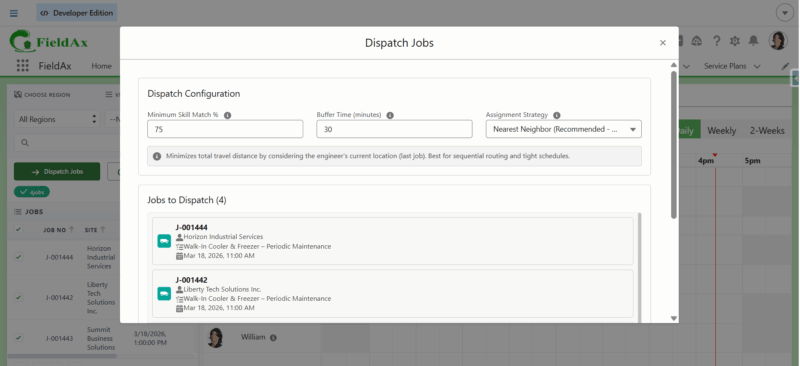
- Dispatch Jobs Button
- Used for assigning new/unassigned jobs to engineers.
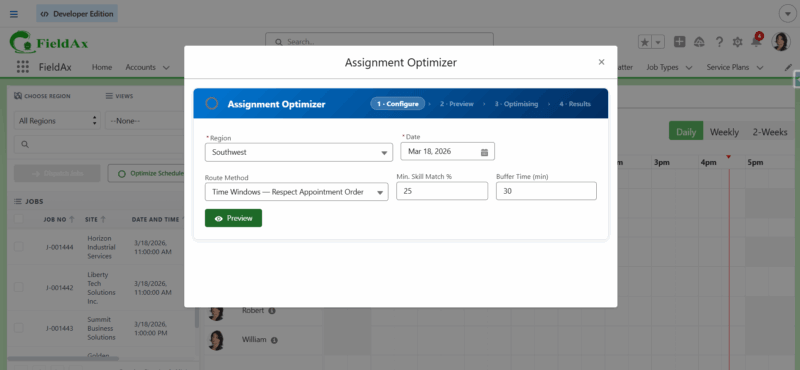
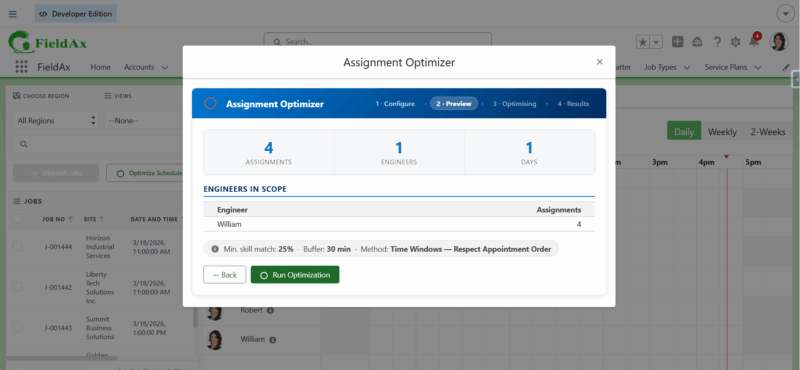
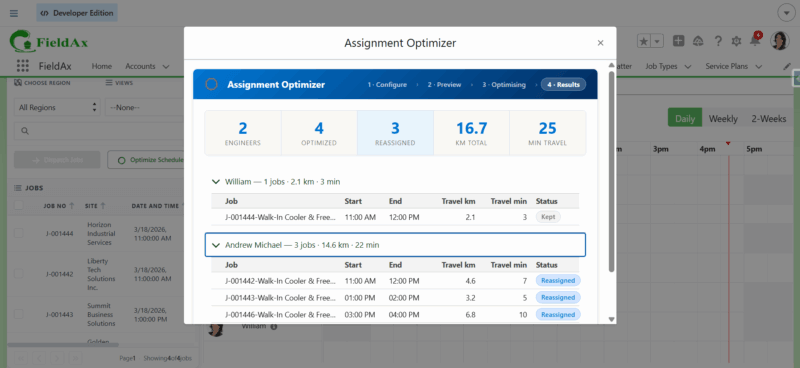
- Optimize Schedule Button
- Used for reordering existing assigned jobs to improve route efficiency.
- Dispatch Jobs Button
1.5 How It Works
- Navigate to the Dispatch Board
- Select jobs from the left-side job panel
- Click Dispatch Jobs
- Configure dispatch parameters:
- Minimum Skill Match (%)
- Buffer Time (minutes) – Time gap between consecutive assignments
- Assignment Strategy:
- Shortest Route Optimization
- Time Window Optimization
- Click Start Dispatch
- Review the Dispatch Results
- Click Refresh Calendar to update the Gantt view
1.6 Benefits
 Faster and smarter job allocation
 Reduced travel time and operational costs
 Improved adherence to appointment schedules
 Better utilization of field engineers
 Accurate and constraint-based scheduling
Summary
The Smart Dispatch Optimization feature brings together route intelligence and scheduling awareness to ensure that the right job is assigned to the right engineer at the right time, making FieldAx more efficient, reliable, and scalable for real-world field service operations.
2. Traffic-Aware Route Visualization
Overview
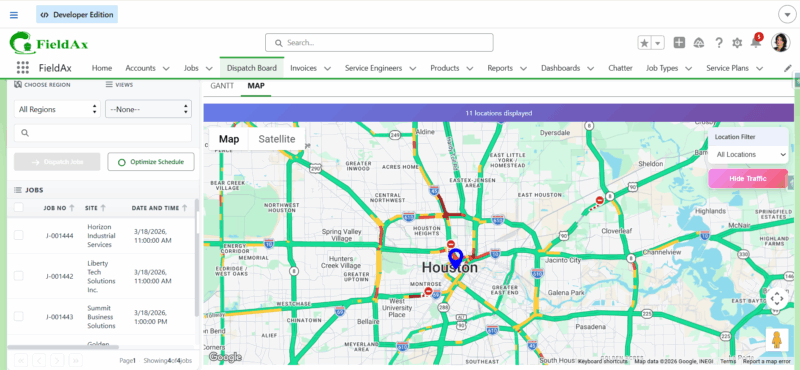
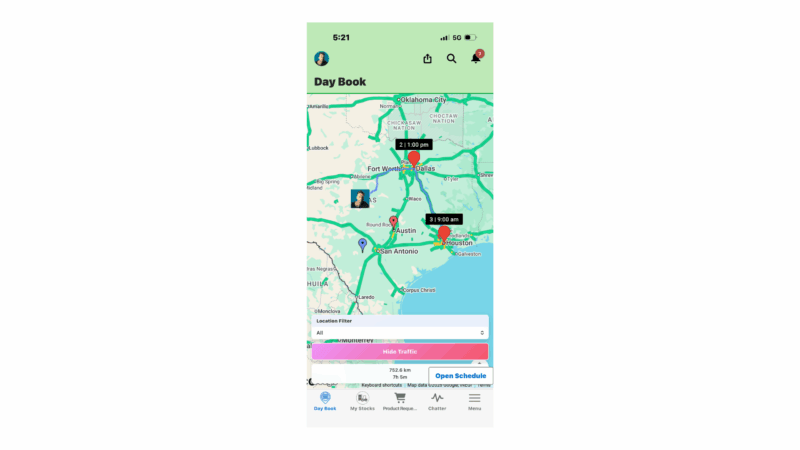
We are pleased to introduce Traffic Information on Service Engineer Route Maps in FieldAx. This enhancement brings real-time traffic visibility into both the Daybook and Dispatch Board Map View, enabling smarter route planning and better decision-making for dispatchers and service teams.
2.1 Key Feature: Traffic-Enabled Route Map
FieldAx now displays live traffic conditions directly on the map for service engineer routes. This helps users visualize delays, optimize travel paths, and improve on-time service delivery.
2.2 Where This Feature is Available
- Dispatch Board – Map View
- Daybook – Route Map View
Capabilities
2.3 Real-Time Traffic Visualization
- Roads are color-coded based on traffic conditions:
- Green – Smooth traffic
- Yellow/Orange – Moderate traffic
- Red – Heavy traffic / congestion
- Roads are color-coded based on traffic conditions:
2.4 Traffic Toggle Option
- Users can easily:
- Enable traffic view
- Disable traffic view using the “Show/Hide Traffic” button
- Allows flexibility to switch between clean map view and traffic-aware view.
- Users can easily:
2.5 Benefits
 Improved Route Planning – Avoid congested routes
 Accurate ETAs – Better estimation of arrival times
 Reduced Delays – Proactively handle traffic-heavy areas
- Better Engineer Productivity – Optimized travel between jobs
 Enhanced Customer Satisfaction – Increased on-time service
Summary
The Traffic Information feature enhances FieldAx’s mapping capabilities by adding real-world traffic intelligence to service routes.
3. Part Transfers Enhancement
Overview
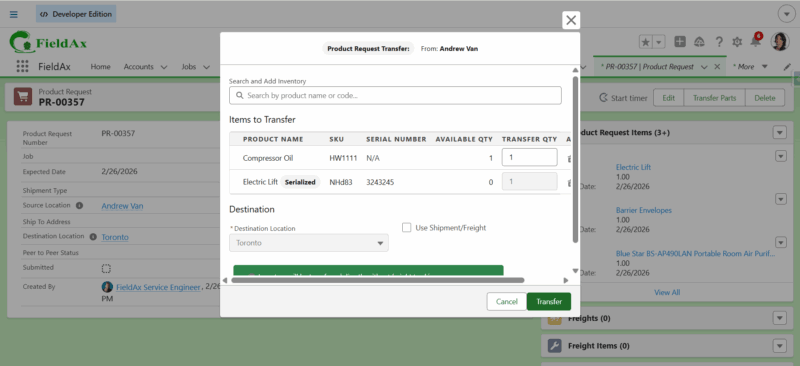
We are pleased to introduce enhancements to the Part Transfers functionality within the Product Request process in FieldAx. This upgrade provides greater flexibility and control when transferring parts between locations, improving efficiency and accuracy in inventory operations.
Key Enhancement
3.1 Dual Transfer Options
Users can now transfer parts using two methods:
- Direct Transfer (Without Freight)
- Immediate transfer between source and destination
- Ideal for quick and urgent requirements
- Freight Transfer
- Suitable for planned or long-distance shipments
- Enables better logistics handling and tracking
- Direct Transfer (Without Freight)
3.2 Dynamic Product Management during Transfer
Users now have the flexibility to manage products directly within the transfer process:
 Add Products – Include additional items during transfer
 Remove Products – Exclude unnecessary items before confirmation
 Modify Quantity – Increase or decrease the quantity of selected products
This ensures accurate and need-based part transfers without requiring multiple requests.
3.3 Improved Transfer Workflow
- All product modifications can be done before completing the transfer
- Reduces errors and eliminates the need for rework
- Ensures that only the required parts and quantities are transferred.
3.4 Benefits
 Flexible Transfer Process – Choose the right transfer method based on need
 Real-Time Editing – Modify products and quantities during transfer
 Improved Accuracy – Transfer only required items
 Operational Efficiency – Reduce multiple requests and manual corrections
 Better Inventory Control – Optimized usage of stock across locations
Summary
The Part Transfers upgrade enhances the Product Request workflow by introducing flexible transfer options and dynamic product management. This ensures a more efficient, accurate, and user-friendly process for handling part movements within FieldAx.
4. My Stocks Enhancement
Overview
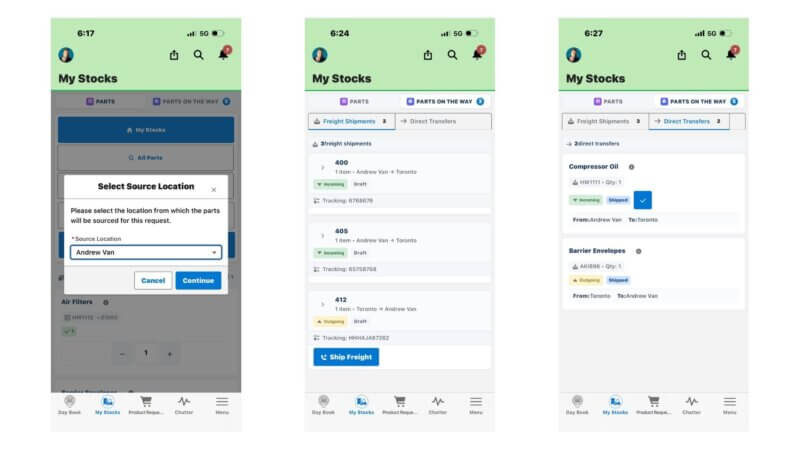
We are excited to introduce the upgraded My Stocks module in FieldAx. This enhancement improves how service engineers and users request, transfer, and track parts, providing better control, visibility, and flexibility in inventory management.
Key Enhancement
4.1 Flexible Parts Request Options
Users can now request parts from multiple entry points:
- My Stocks
- All Parts
- Required Parts
Additionally, users can select the source location from where the parts should be requested, enabling better control over inventory sourcing.
4.2 Multiple Transfer Methods
The upgraded My Stocks module supports two types of part transfers:
- Direct Transfer
- Immediate transfer between locations
- Faster fulfillment for urgent requirements
- Freight Shipment
- Suitable for longer distances or planned logistics
- Includes shipment tracking and status updates
- Direct Transfer
Users can initiate both transfer types directly from the My Stocks section.
4.3 “Parts on the Way” Tracking Tab
A new Parts on the Way tab has been introduced to provide complete visibility of in-transit parts.
This tab allows users to:
- Track all ongoing transfers (Direct & Freight)
- View shipment details and status
- Monitor part movement between locations
4.4 Shipment Status Management
For Freight Shipments
- Users can update:
- Shipped
- Received
- Enables end-to-end tracking of shipment lifecycle
- Users can update:
For Direct Transfers
- Users can update:
- Received
- Simplifies confirmation of completed transfers
- Users can update:
4.5 Detailed Transfer Visibility
- Users can view complete details of each transfer, including:
- Source and destination locations
- Transfer type (Direct / Freight)
- Current status
- Product
- Quantity
- Users can view complete details of each transfer, including:
- Improves transparency and reduces tracking gaps
4.6 Benefits
- Improved Inventory Control – Better visibility across locations
- Flexible Transfer Options – Choose between direct and freight methods
- Real-Time Tracking – Monitor parts in transit
- Faster Operations – Quick handling of urgent part requirements
- Enhanced Accuracy – Reduced errors in part movement tracking
Summary
The My Stocks upgrade brings a more streamlined, transparent, and flexible inventory workflow in FieldAx. With enhanced request options, transfer methods, and real-time tracking, users can now manage parts more efficiently and ensure timely availability for service operations.
5. Inventory Console Enhancement
Overview
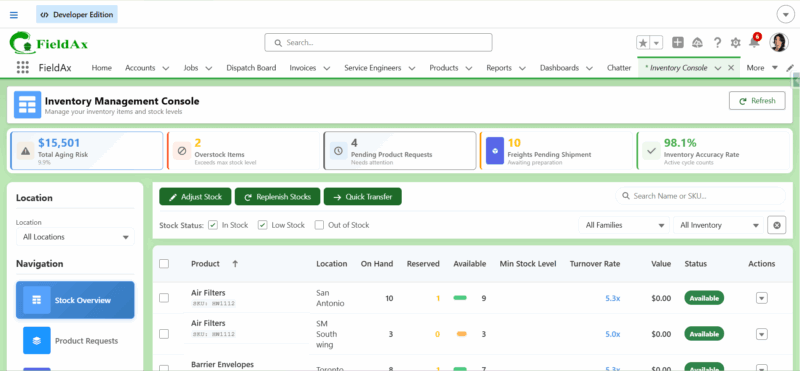
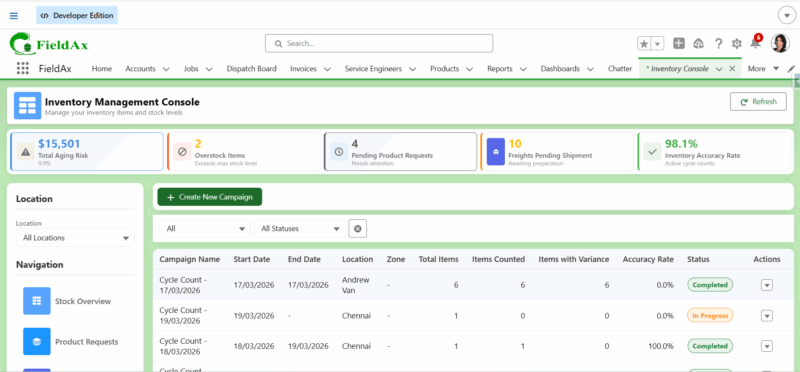
We are excited to introduce the upgraded Inventory Management Console in FieldAx. This enhancement provides a centralized, data-driven view of inventory health, along with improved capabilities for tracking, transferring, and managing stock across locations.
Key Enhancements
5.1 Inventory Health Metrics Dashboard
The Inventory Console now displays key performance indicators to help users monitor inventory status in real time:
- Total Aging Risk
- Represents the total value of inventory that has not moved for more than 180 days
- Helps identify slow-moving or dead stock
- Overstock Items
- Items where On-Hand Quantity exceeds Maximum Stock Level
- Enables proactive stock balancing and reduction of excess inventory
- Pending Product Requests
- Displays all submitted but not yet completed Product Requests (PRs)
- Helps track outstanding inventory demands
- Freights Pending Shipment
- Shows all freight transfers that are not yet shipped
- Improves visibility into pending logistics
- Inventory Accuracy Rate
- Based on manual cycle counting
- Calculated during each completed cycle count based on discrepancies (missing or mismatched items)
- Provides insight into inventory accuracy and reliability
- Total Aging Risk
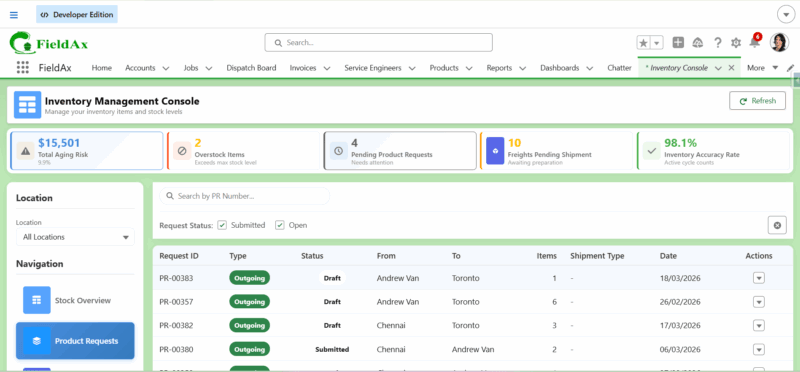
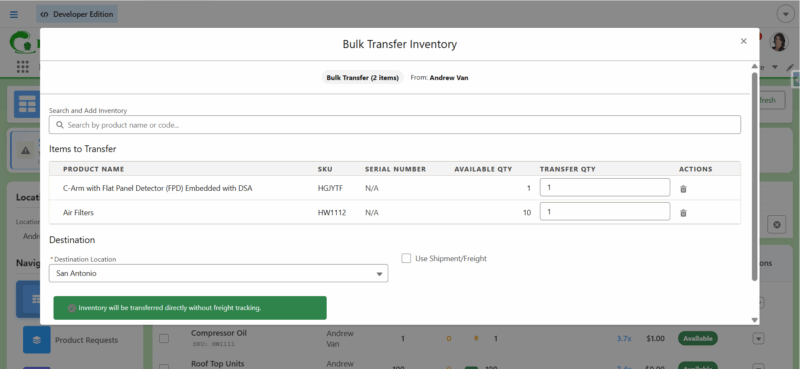
5.2 Integrated Product Request & Transfer
- Users can now initiate product transfers directly from the Inventory Console
- Supports both:
- Direct Transfers
- Freight Shipments
- Streamlines the inventory movement process without navigating to separate modules
Additional Capabilities:
- Filter Product Requests based on:
- Submitted Requests
- Open Requests
- Filter Product Requests based on:
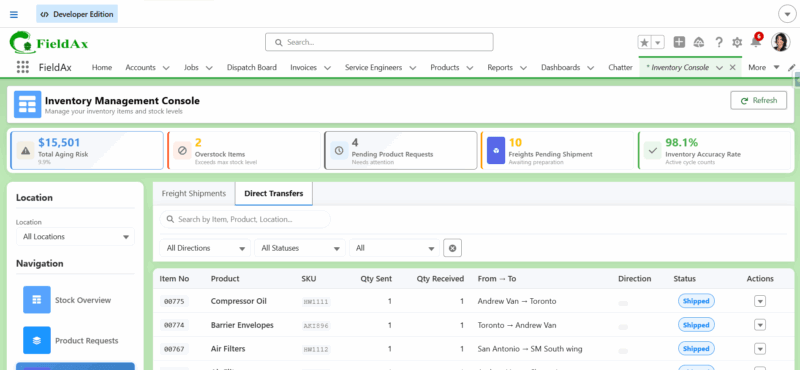
5.3 Shipment Tracking & Status Management
- Track all transfers across all locations within the console
- Supports both:
- Freight Shipments
- Direct Transfers
Users can:
- Update Shipped
- Update Received
- View detailed transfer information
Additional Capabilities:
- Filter shipments based on:
- Incoming and Outgoing Freight
- Status – Pending, Shipped, Delivered
- Apply time-based filters:
- This Week
- This Month
- This Year
- Filter shipments based on:
5.4 Multi-Location Inventory Visibility
- Provides a unified view of stock across different locations
- Helps users:
- Monitor stock availability
- Identify shortages or excess stock
- Take immediate action
5.5 Cycle Count Campaigns (Inventory Accuracy Management)
- Users can create a new inventory campaign for a specific location
- Perform manual stock counting
- Enter actual counted values directly
This process:
- Updates the Inventory Accuracy Rate
- Helps identify discrepancies between system stock and physical stock
- Improves overall inventory reliability
5.6 Benefits
 Centralized Dashboard – All inventory insights in one place
- Improved Stock Visibility – Real-time tracking across locations
- Seamless Transfers – Initiate and manage transfers directly
 Better Logistics Tracking – Monitor freight and direct transfers
 Accurate Inventory Data – Cycle counting improves reliability
- Operational Efficiency – Faster decision-making and reduced manual effort
Summary
The upgraded Inventory Console transforms inventory management in FieldAx by combining real-time insights, transfer capabilities, and accuracy tracking into a single, powerful interface. This ensures better control, improved efficiency, and more reliable inventory operations across the organization.
6. “Hide on Gantt” Control for Assignments
Overview
We have introduced a new field called “Hide on Gantt” in the Assignment record. This feature provides greater control over the visibility of assignments in the Dispatch Board and Quick Dispatch, allowing users to manage scheduling views more effectively.
6.1 Key Feature: Hide on Gantt
The “Hide on Gantt” checkbox enables users to control whether a particular assignment should be visible in scheduling interfaces.
6.2 Functionality
- When “Hide on Gantt” is Enabled (Checked):
- The assignment will not be displayed in:
- Dispatch Board (Gantt View)
- Quick Dispatch
- Useful for hiding:
- Internal or non-operational assignments
- Tentative or draft assignments
- Completed or irrelevant scheduling entries
- The assignment will not be displayed in:
- When “Hide on Gantt” is Disabled (Unchecked):
- The assignment will be visible in:
- Dispatch Board (Gantt View)
- Quick Dispatch
- Allows normal scheduling and visibility
- The assignment will be visible in:
- When “Hide on Gantt” is Disabled (Unchecked):
6.3 Use Cases
- Hide assignments that are not required for dispatch planning
- Temporarily remove assignments from view without deleting them
- Reduce clutter in the Gantt view for better clarity
- Manage special or internal tasks that should not impact scheduling
6.4 Benefits
- Improved Visibility Control – Show only relevant assignments
 Cleaner Gantt View – Reduce unnecessary clutter
- Flexible Management – Hide/unhide without deleting records
- Better Scheduling Experience – Focus on actionable assignments
Summary
The “Hide on Gantt” feature enhances scheduling flexibility in FieldAx by allowing users to control assignment visibility across Dispatch Board and Quick Dispatch. This results in a cleaner interface, better focus, and improved operational efficiency.
7. Dispatch Board UI Improvement
Overview
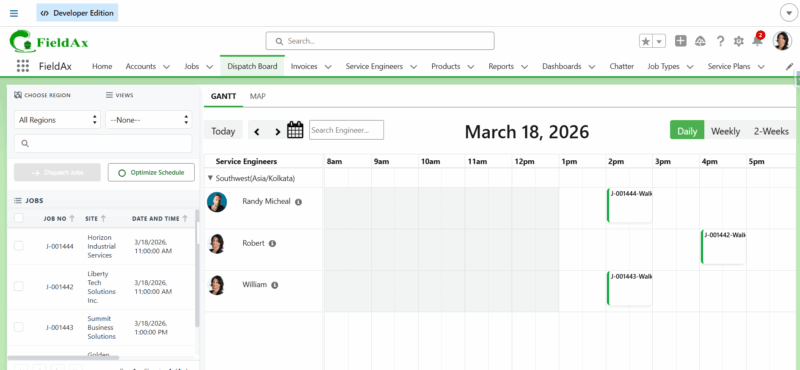
We have enhanced the Dispatch Board User Interface (UI) in FieldAx to provide a more intuitive, modern, and user-friendly experience. These improvements focus on better usability, clearer visual indicators, and improved accessibility of key actions.
7.1 Improved Filter Section (Choose Region & Views)
- Added icons/symbols to:
- Choose Region
- Views Filter
- Enhances:
- Visual clarity
- Faster identification of filter options
- Makes the filtering experience more intuitive for users
- Added icons/symbols to:
7.2 Action Button UI Enhancement
- Updated the design and positioning of:
- Dispatch Jobs Button
- Optimize Schedule Button
- Improvements include:
- Cleaner alignment
- Better visibility
- Consistent styling with modern UI standards
- Updated the design and positioning of:
7.3 Overall UI Refinements
- Improved layout consistency across the Dispatch Board
- Enhanced spacing and alignment for better readability
- Cleaner and more structured presentation of components
- Better visual distinction between sections
Benefits
- Improved Usability – Easier navigation and interaction
- Better Visual Clarity – Icons and layout improve readability
- Faster Operations – Users can quickly access filters and actions
 Modern Experience – Updated UI aligned with current design standards
Summary
The Dispatch Board UI improvements enhance the overall user experience by introducing visual indicators, better layout structure, and improved action accessibility. These changes make the Dispatch Board more efficient, intuitive, and user-friendly for daily operations.
8. New Survey Module
Overview
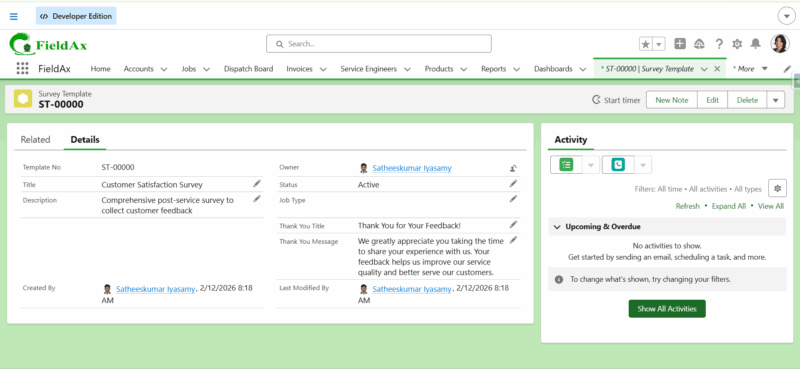
We are excited to introduce the Survey Module in FieldAx. This feature enables organizations to collect structured feedback from customers by creating customizable survey templates and sharing them via links. The responses submitted by customers are automatically updated in the survey records for tracking and analysis.
8.1 Survey Template Creation
- Users can create Survey Templates to define the structure of surveys
- Each template acts as a reusable format for collecting feedback
- Helps standardize surveys across different use cases
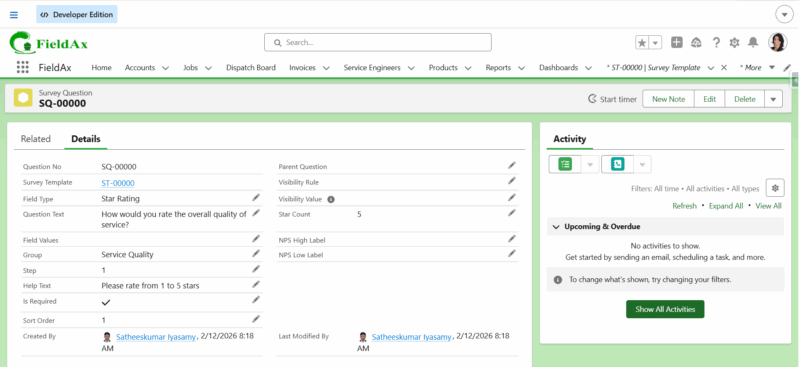
8.2 Configurable Survey Questions
- A related object Survey Questions is available under Survey Template
- Users can:
- Add multiple questions
- Configure question types (e.g., rating, text, etc.)
- Define question order, grouping, and required fields
- Fully customizable based on business needs
8.3 Survey Link Generation & Sharing
- Once a survey is created, a unique survey link is generated
- This link can be:
- Shared with customers
- Sent via email or other communication channels
8.4 Customer Response Capture & Update
- Customers can access the survey using the shared link
- Submit their responses easily
- The submitted responses are:
- Automatically updated in the respective survey record
- Stored for future reference and analysis
8.5 Data Management & Tracking
- All responses are stored within Salesforce
- Enables:
- Easy tracking of survey results
- Historical data maintenance
- Performance and feedback analysis
8.6 Benefits
 Customizable Surveys – Flexible question configuration
 Easy Sharing – Link-based survey access
- Centralized Data – Responses stored in one place
- Better Insights – Improved understanding of customer feedback
- Improved Decision-Making – Data-driven service improvements
Summary
The Survey Module enables end-to-end feedback collection in FieldAx, allowing businesses to create surveys, share them with customers, and automatically capture responses. This helps improve service quality through real-time feedback and structured data collection.
9. Bug Fix: Holiday/Time-Off Restriction in Quick Dispatch (FieldAx)
Overview
We have fixed an inconsistency in the Quick Dispatch functionality related to Holiday and Time-Off restrictions. This update ensures that service engineer availability rules are now consistently enforced across all dispatching methods in FieldAx.
9.1 Issue Summary
Previously, when a Holiday or Time-Off record was created for a service engineer:
- The Dispatch Board correctly prevented assigning jobs during the restricted period
- However, in Quick Dispatch:
- Resources View allowed assignment
This resulted in inconsistent behavior and potential scheduling conflicts.
9.2 Fix Implemented
The system has been updated to ensure that:
- Holiday and Time-Off restrictions are now strictly enforced in Quick Dispatch
- Applies to:
- Resources View
Engineers on leave or holiday cannot be assigned to jobs during restricted periods.
9.3 Impact
- Ensures consistent validation across dispatch workflows
- Prevents accidental assignment of unavailable engineers
- Improves schedule accuracy and reliability
- Reduces operational errors and rework
Benefits
- Accurate Resource Availability – Engineers are only assigned when available
- Reliable Scheduling – No conflicts with leave or holidays
 Consistency Across Modules – Same rules applied everywhere
- Improved User Trust – Predictable and correct system behavior.
Summary
This fix resolves a critical inconsistency by aligning Quick Dispatch behavior with Dispatch Board rules, ensuring that Holiday and Time-Off constraints are always respected. This enhances the overall reliability and accuracy of scheduling in FieldAx.
Winter 25 - Date: 20th Jan, 2026
FieldAx WINTER 25 Release – Version: 1.28
Date: 20th January 2026
New Features: File Upload, Smart Parts Planning & Configurable Reports Zip-Based Dispatch & Engineer Work Calendar Visibility
The user interface across key service workflow pages has been enhanced to improve usability, consistency, and navigation for service engineers.
What’s Updated
UI improvements have been applied to the following pages:
- Add Items
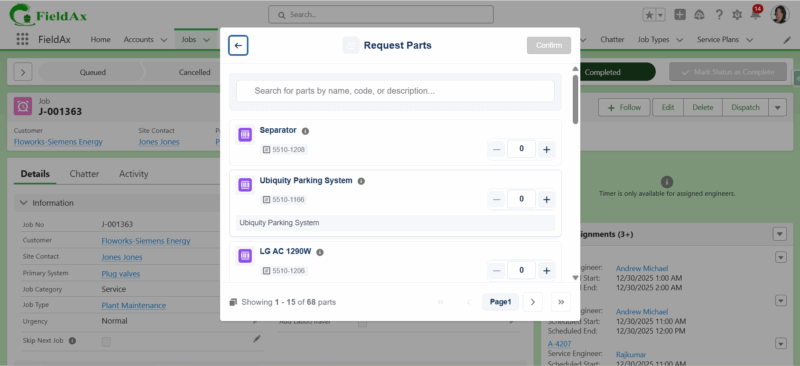
- Request Parts
- Debrief
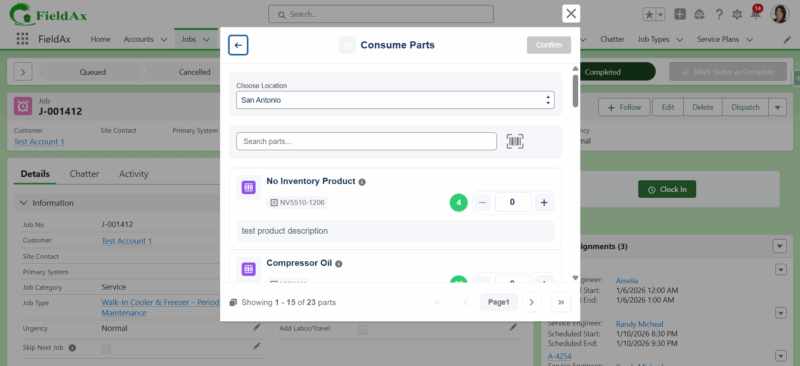
- Consume Parts
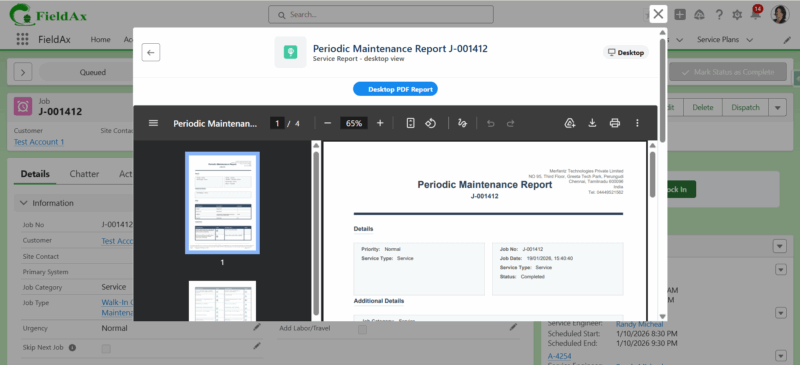
- Service Report
Key Improvements
- Improved page layout and visual consistency
- Simplified navigation between service workflow pages
- Enhanced user experience during service execution
Impact
- No changes to existing functionality
- No impact on existing data or workflows
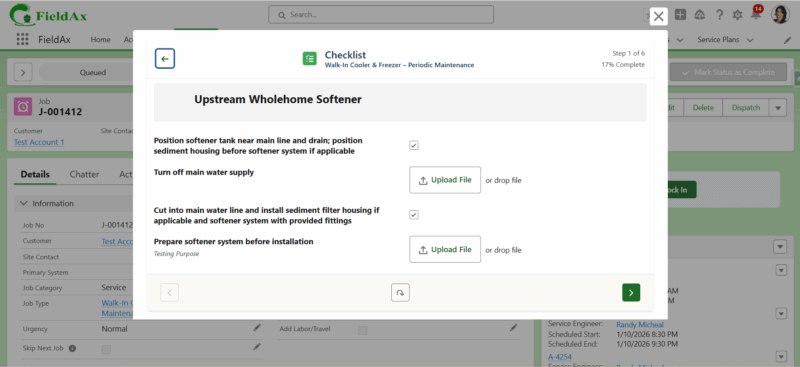
Checklist File Upload Support
Overview
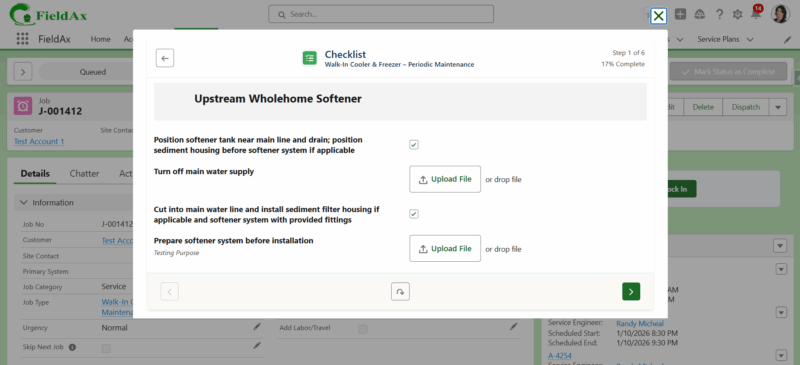
FieldAx now supports file uploads in checklist items, enabling service engineers to attach photos or documents as part of job execution and reporting.
What’s New
- A new File Upload field type is available in Checklist Configuration under Job Types.
- When a job is created using a Job Type with the File Upload checklist field:
- Checklist items are automatically added to the job.
- The File Upload option is available in the Debrief checklist.
- Uploaded files are automatically included in the Service Report.
Benefits
- Allows service engineers to upload photos or documents as proof of work
- Ensures uploaded evidence is visible in the Service Report
- Improves compliance, transparency, and job documentation
Impact
- No impact on existing jobs or checklist configurations
- Feature is applicable only when the File Upload field type is configured.
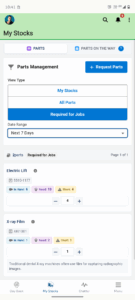
My Stocks Upgrade (Mobile App)
Overview
The My Stocks feature in the FieldAx mobile app has been upgraded to improve visibility of required parts across jobs and enable part requests directly from the My Stocks screen.
What’s New
Required Parts – New Enhancement
- A new Required Parts option is now available in My Stocks.
- FSEs can view required parts for all assigned jobs based on a selected date range:
- Today
- Tomorrow
- Next 7 Days
- This Week
Consolidated Parts Requirement View
For the selected date range, the system displays:
- Total parts required across jobs
- In-hand quantity at the FSE’s trunk location
- On-the-way quantity
- Required quantity
Part Request from My Stocks
- FSEs can raise part requests directly from the Required Parts screen.
- Requests can be created based on shortages identified in the selected date range.
Benefits
- Clear visibility of upcoming parts requirements
- Better planning for multiple jobs at once
- Faster part requests without navigating to individual jobs
- Reduced risk of job delays due to missing parts.
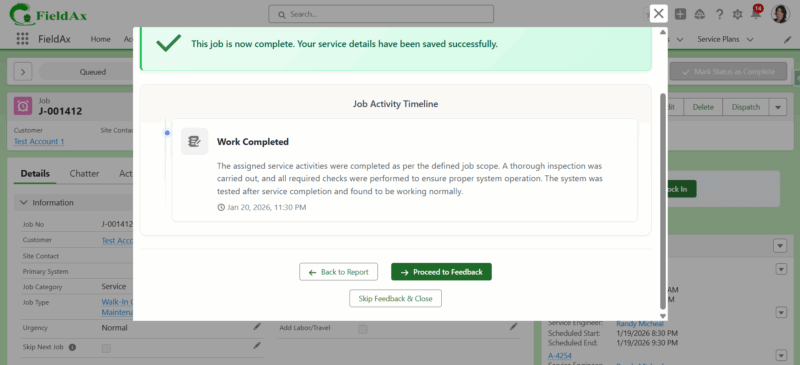
Service Report Summary Upgrade
The Service Report Summary has been enhanced to provide a more flexible and configurable experience.
When a service engineer completes a job, the Service Report is generated. On clicking the “Complete Job” button within the service report, a Summary view is displayed.
This summary is now customizable.
With this upgrade:
- A new Job Action Log object is introduced under the Job.
- Any entries configured in the Job Action Log will automatically appear in the Service Report Summary.
- This allows teams to control and customize what information is shown in the summary, based on business needs.
Benefits:
- Improved visibility of job activities in the service report
- Configurable and dynamic summary content
- Better clarity for customers and internal teams
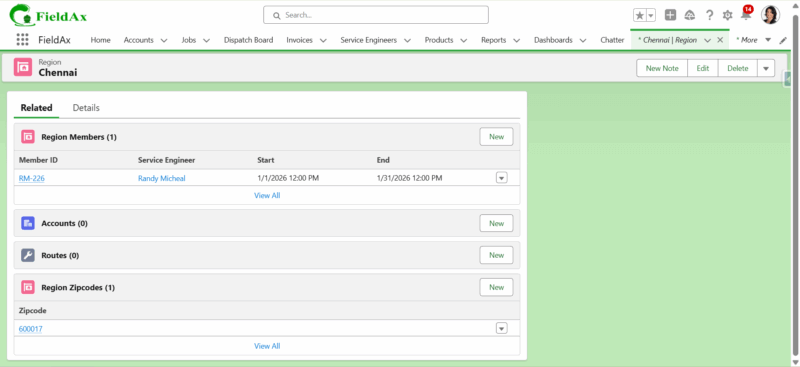
Dispatch from Job – Zip Code–Based Region Mapping
Overview
FieldAx now supports dispatching service engineers based on Zip Code–to–Region mapping, improving accuracy when assigning engineers using the Quick Schedule option from a job.
What’s New
- Regions can now be configured with Zip Codes.
- When the Dispatch button is clicked from a Job, the system:Checks the Account Address Zip Code.
- Identifies the matching Region based on the Zip Code configuration.
- Displays only the Service Engineers mapped to the matched Region.
Benefits
- More accurate service engineer selection based on job location.
- Faster dispatching with reduced manual filtering.
- Improved regional assignment and coverage control.
Impact
- No impact on existing jobs or workflows.
- Feature applies only when Zip Codes are configured under Regions.
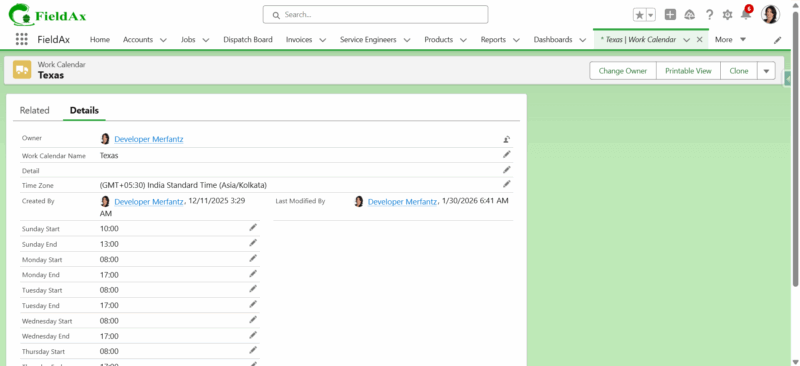
Service Engineer Work Calendar & Availability Visualization
Overview
FieldAx now supports configuring a Work Calendar at the Service Engineer level, enabling accurate visibility of engineer availability across scheduling tools.
What’s New
- A Work Calendar can be configured for each Service Engineer.
- Start and end working hours can be defined day-wise (Sunday through Monday / all days).
- The configured work calendar is used to determine the engineer’s availability.
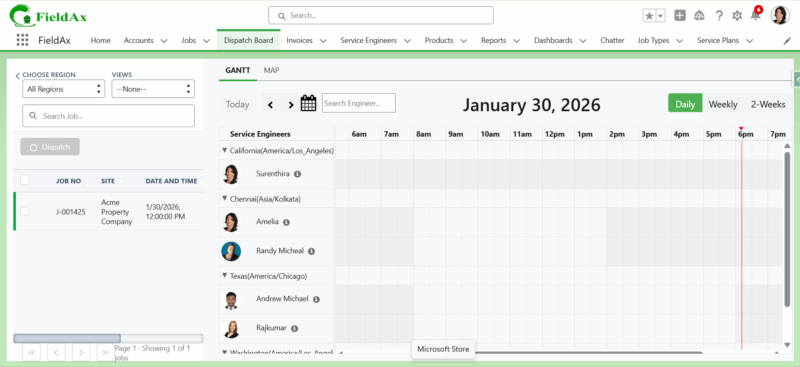
Availability Display
- Available time is displayed in White color.
- Non-working / unavailable time is displayed in Grey color.
Where It Reflects
- Dispatch Board
- Quick Schedule
Both views now respect the Service Engineer’s work calendar while showing availability and scheduling jobs.
Benefits
- Accurate scheduling based on actual working hours
- Clear visual differentiation between available and unavailable time slots
- Reduces scheduling conflicts and improves dispatch efficiency
Winter 25 - Date: 25th Sept, 2025
FieldAx WINTER 25 Release – Version: 1.26
Date: 25th September 2025
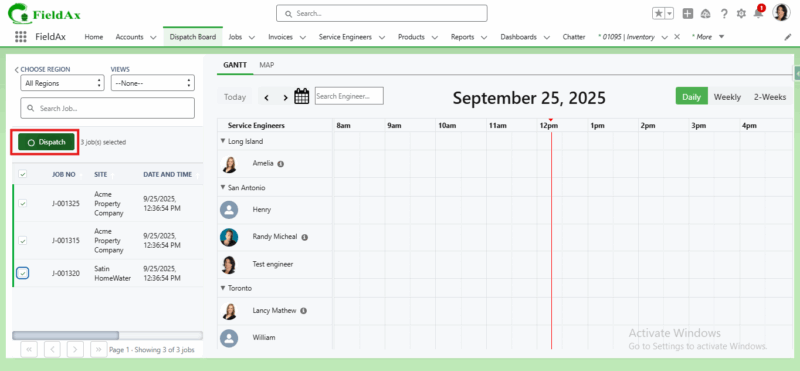
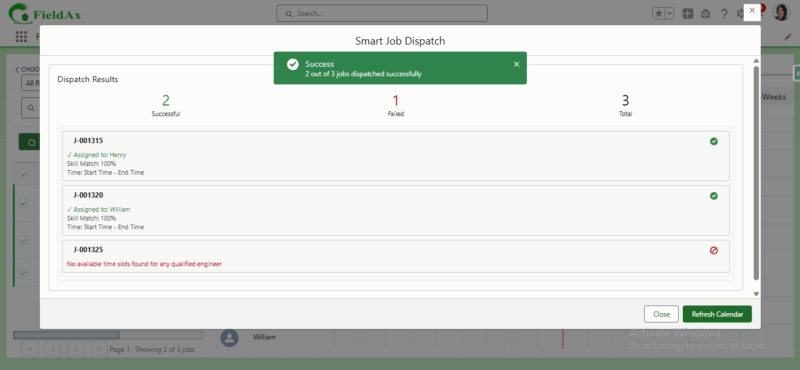
New Feature: Auto Dispatch Based on Region, Skills, and Travel Time
We’ve enhanced the job scheduling process in FieldAx with a smarter, automated dispatch feature.
What’s New?
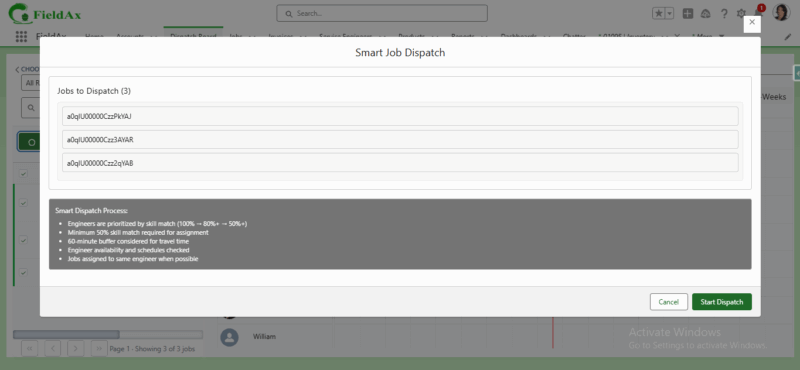
- Auto Dispatch Button: Instead of manually assigning jobs using drag-and-drop, you can now select jobs and click Dispatch to automatically assign them to the right technician.
- Region-Based Assignment: Jobs are automatically matched with technicians operating in the same region.
- Skill Matching: Skills are configured at the Job Type level. FieldAx ensures that jobs are only assigned to technicians with the required skills.
- Travel Time Optimization:
- When assigning a new job, FieldAx checks the technician’s existing assignments for that day.
- The system calculates whether there is sufficient travel time between the previous job’s end time and the new job’s start time.
- If feasible, the assignment is created. If not, the system displays an error message on the assignment process page for that job.
Benefits
- Faster, automated scheduling
- Improved technician utilization
- Reduced travel conflicts and delays
- Ensures the right skills are always matched to the right job
New Feature: Advanced Inventory Console
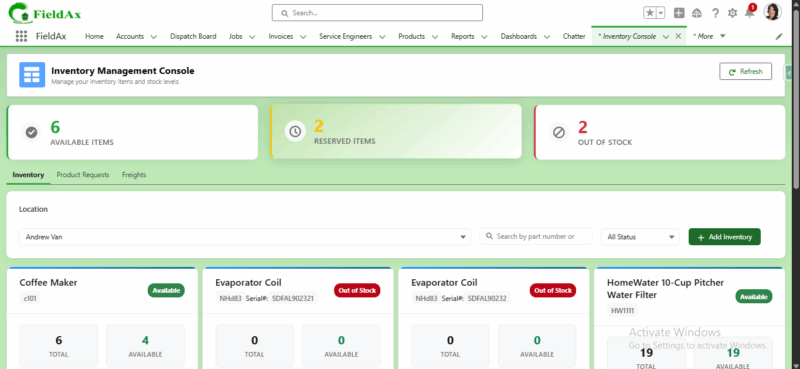
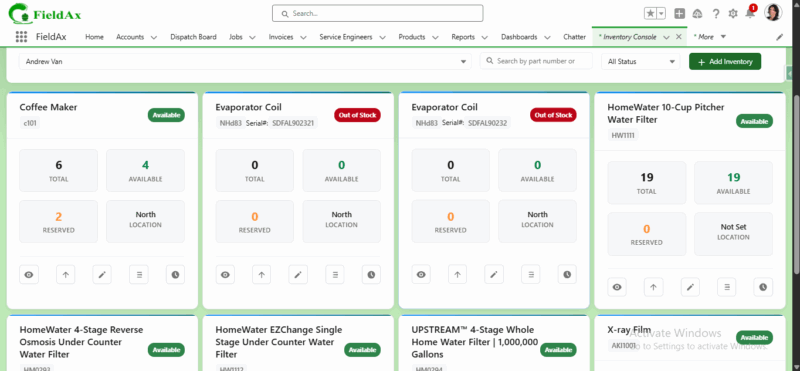
We’ve introduced the Advanced Inventory Console in FieldAx to give you a complete view and control over your inventory management.
What’s New
- Three Dedicated Tabs:
- Inventory:
- View the number of Available Items, Reserved Items, and Out-of-Stock Items for each location.
- Switch between multiple locations to manage stock effectively.
- Search and filter inventory by status (All, Available, Reserved, and Out of Stock).
- Add new inventory directly from the console.
- See detailed inventory data: product name, serial number, total, available, reserved, and location.
- Create Parts Requests for specific products across locations.
- Adjust Stock Quantity to update inventory levels.
- Transfer Inventory between locations:
- Non-serialized items → transfer to multiple locations in different quantities.
- Serialized items → transfer to a single location with one quantity.
- Access Inventory Transaction History with detailed date and time logs.
- Product Requests:
- Track the number of Incoming Requests, Outgoing Requests, and Pending Actions.
- View detailed product request records with real-time status.
- Freights:
- Track the number of Incoming Freight and Outgoing Freight.
- View freight details with current status.
- Quick Refresh: Instantly update the console view with the Refresh button.
- Inventory:
- Three Dedicated Tabs:
Benefits
- Centralized and real-time inventory visibility
- Simplified stock management with search, filters, and history tracking
- Smooth transfer process for both serialized and non-serialized items
- Better control over product requests and freight movements
New Feature: Customizable Service Report
We’ve enhanced the Service Report functionality in FieldAx, giving you full flexibility to tailor reports based on your business needs.
What’s New
- Customizable Layout: Customize service reports by job type for better control and flexibility.
- Job Type–Based Customization: Each job type can now have its own customized service report layout.
- Systems & Parts: Include details of systems serviced and parts used.
- Equipment Photos: Add images of equipment for better documentation and proof of service.
- Customer & Technician Signatures: Capture digital signatures directly on the report.
- Terms & Conditions: Define and include your own terms and conditions for compliance and clarity.
Benefits
- Professional, branded service reports
- Improved clarity and transparency for customers
- Enhanced record-keeping with photos and signatures
- Flexibility to adapt reports to industry-specific requirements
- Tailored reporting for each job type to meet specific operational needs
Upgrade: Signature and Feedback Collection
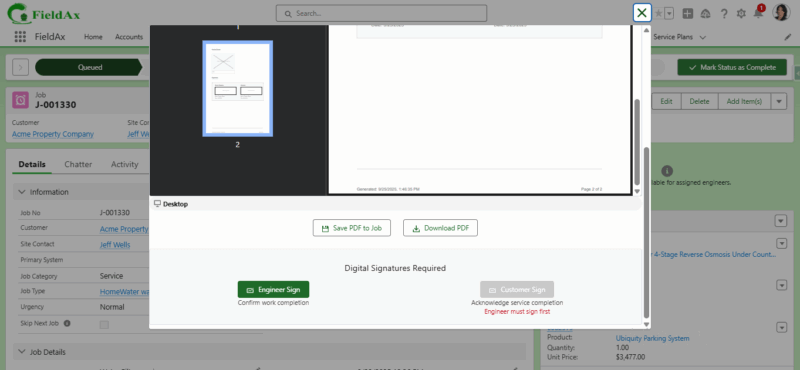
We’ve improved the job completion workflow in FieldAx, making the signature and feedback process more structured and professional.
What’s New
- Engineer Signature First: After reviewing the service report, the engineer must sign before the customer can proceed.
- Customer Signature: Once the engineer’s signature is captured, the customer can sign the report.
- Job Details & Completion Status: After signing, the system displays the job details and completion status for review.
- Feedback with Rating: Customers can now provide feedback with rating options: Excellent, Good, Average, Unsatisfactory — or choose to skip feedback.
- Service Report PDF: The signed service report is saved as a PDF and can be downloaded anytime.
Benefits
- More secure and validated job sign-off process
- Ensures both technician and customer confirmation
- Improved customer experience with quick feedback collection
- Professional service reports with signatures and feedback records
Upgrade: Day Book for Mobile App
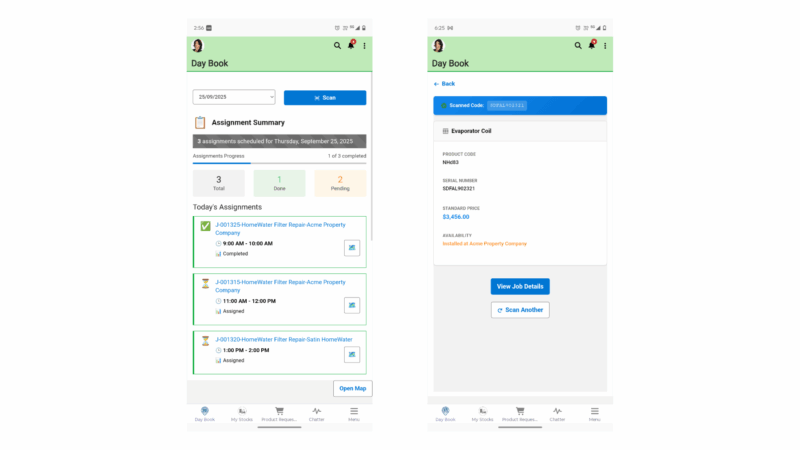
We’ve enhanced the Day Book in the FieldAx mobile app to give service engineers a clearer view of their assignments and quicker access to inventory details.
What’s New
- Optimized Mobile View: A redesigned Day Book interface tailored for service engineers on mobile.
- Daily Assignment Overview: Displays the total number of assignments for the selected date.
- Status Breakdown: Easily track jobs by status — Pending and Done.
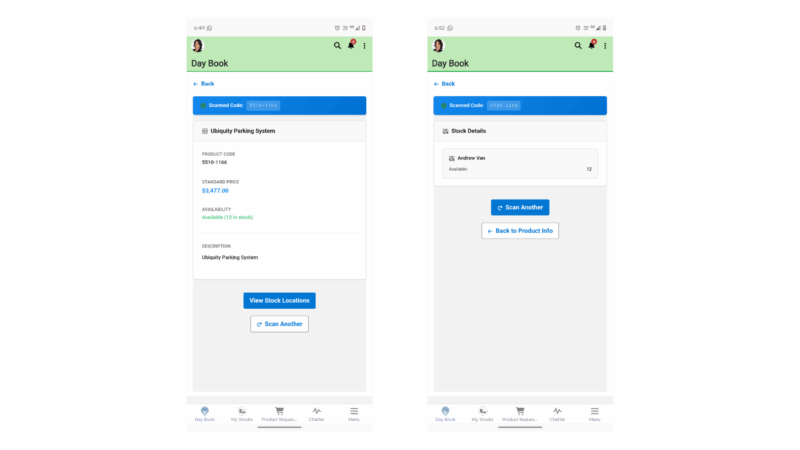
- Inventory Scan Option:
- Scan a product to instantly view details such as Product Name, Price, Availability, and Customer Ownership.
- For serialized products, additional details like Serial Number are displayed.
- Click View Stock Locations to see all locations where the product is available, along with stock levels.
Benefits
- Simplified mobile experience for field engineers
- Quick visibility into daily workload
- Better tracking of job completion and pending tasks
- Faster and more accurate inventory access via scanning
- Improved customer service with real-time product and stock details
New Feature: Simplified Inventory Transfer
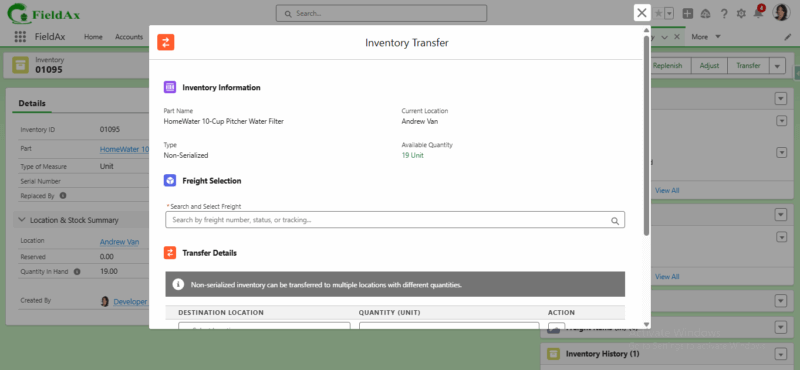
We’ve streamlined the inventory transfer process in FieldAx, making it faster and easier to move parts between locations.
What’s New
- Direct Transfer Button: Transfer inventory directly from the Inventory Record without raising a product request.
- Step-by-Step Transfer Flow:
- Click Transfer on the selected inventory item.
- View inventory details.
- Select the freight, destination location, and quantity.
- Complete the transfer.
- Serialized vs Non-Serialized Handling:
- Non-serialized inventory → can be transferred to multiple locations with different quantities.
- Serialized inventory → can only be transferred to one location with one quantity.
- Record-Level Transfers: Easily transfer parts at the individual inventory record level.
Before vs Now
- Before: Users had to first raise a Product Request and then perform a transfer, which added extra steps and delays.
- Now: Transfers can be initiated instantly with a single click, saving time and improving efficiency.
Benefits
- Faster inventory movement without extra steps
- Flexible transfer process for both serialized and non-serialized parts
- Improved accuracy and control at the record level
Upgrade: Clock In / Clock Out
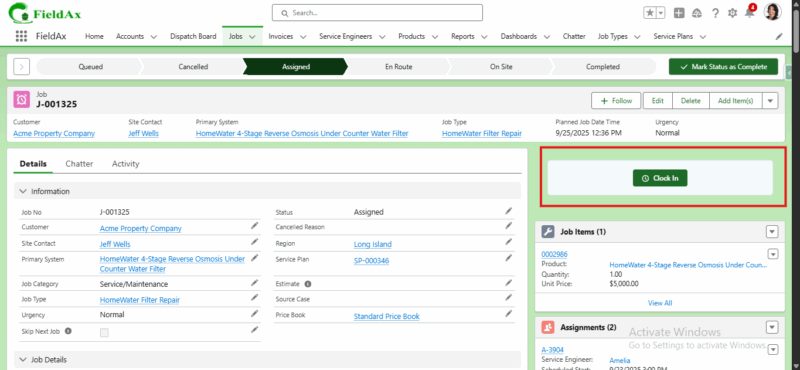
We’ve enhanced the time logging process in FieldAx to make it easier and more structured for service engineers.
What’s New
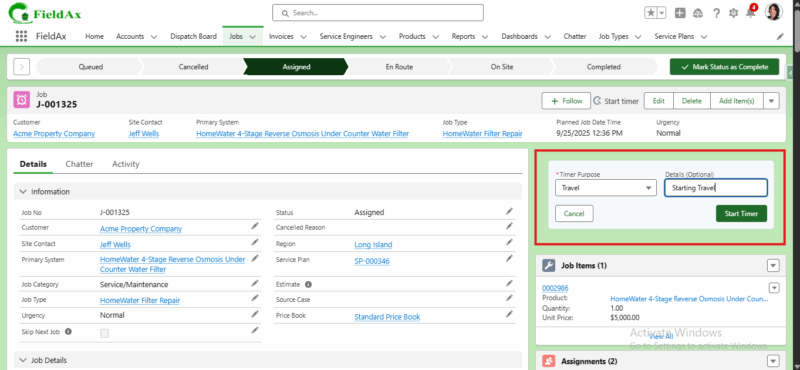
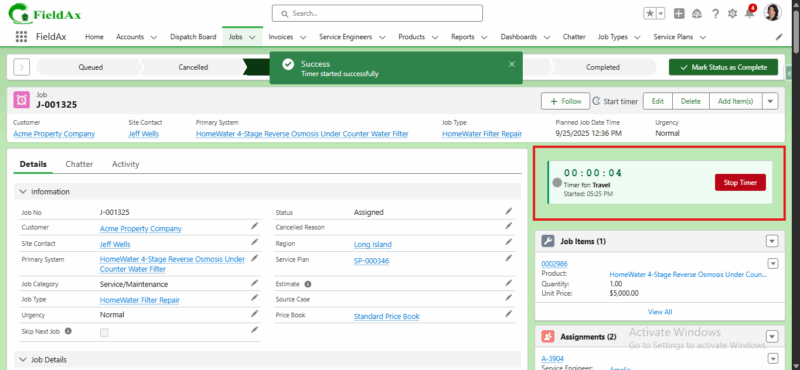
- Clock In Options:
- Available directly on the Job Record page for both Travel and Job
- Visible only to the assigned service engineer.
- Notes with Time Logs: Engineers can now add notes while clocking in and out for better tracking and context.
- Time Card Creation: As before, time logging automatically creates a Time Card record, now with additional notes captured.
- Clock In Options:
Before vs Now
- Before: Engineers logged time using the Log Time button. The timer started and a time card was created automatically, but without the option to add notes.
- Now: Engineers can Clock In/Out directly on the job page, with the ability to add notes, making records more detailed and transparent.
Benefits
- Simplified and structured time logging
- Richer records with notes for travel and job activities
- Maintains automatic time card creation with improved flexibility
New Feature: Region Planner for Resources
We’ve improved region management in FieldAx to give you more flexibility when assigning service engineers to different regions.
What’s New
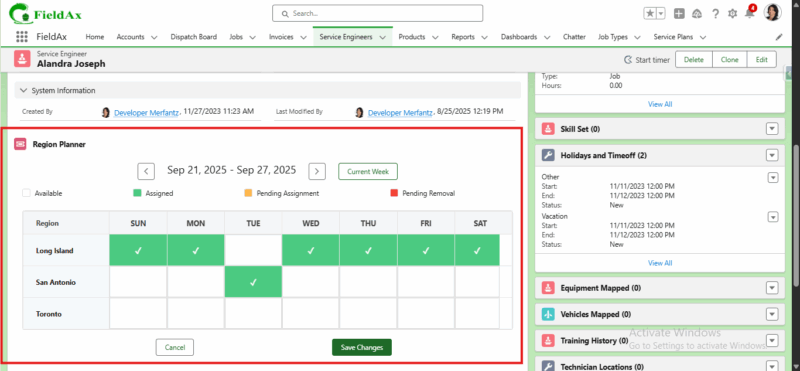
- Region Planner:
- Assign a service engineer to a region for a full month as before.
- If the engineer needs to work in a different region for 1 or 2 days mid-month, simply select the dates in the Region Planner and click Save.
- The system will automatically split the existing assignment and add the new region membership for the selected dates.
- You can also change the date range directly in the Region Planner for even more flexibility.
- Region Planner:
Before vs Now
- Before: Once a service engineer was assigned to a region for a month, it couldn’t be changed mid-month without manual adjustments.
- Now: Region assignments can be updated mid-month, and dates can be adjusted easily in the Region Planner, eliminating manual edits.
Example
- Engineer assigned to Region A for the whole month of September.
- Mid-month change required:
- Region A → 1st–14th
- Region B → 15th–16th
- Region A → 17th–30th
- The Region Planner automatically splits and updates these assignments once saved.
Benefits
- Greater flexibility in managing engineer availability
- Quick mid-month region adjustments without manual effort
- Easy date changes directly in the planner
- Accurate scheduling and resource planning across multiple regions
New Feature: Advanced Route Map with Jobs and Locations on the Way
We’ve upgraded the Route Map in FieldAx to provide service engineers with a smarter and more informative view of their routes.
What’s New
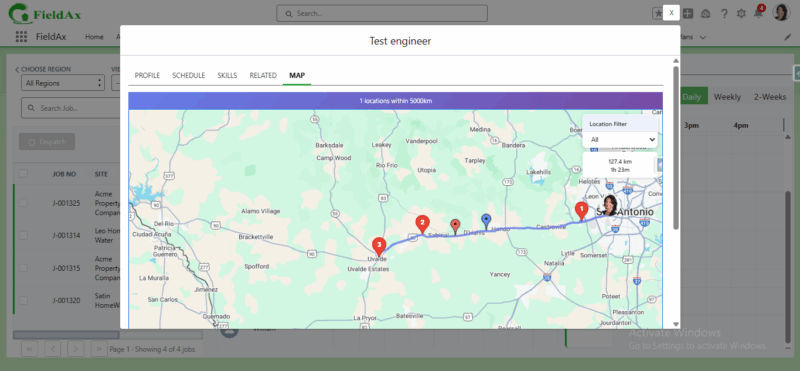
- Assigned Job Locations: Continue to see all jobs assigned to the service engineer.
- On-the-Way Job Locations: The map now highlights other job locations that fall along the engineer’s route, even if those jobs are not assigned to them.
- Inventory Locations: Inventory storage points are also displayed on the map, giving engineers visibility of nearby stock availability.
Before vs Now
- Before: The route map only displayed the assigned job locations for the service engineer.
- Now: The map shows assigned jobs, additional on-route jobs, and inventory locations — all in one view.
Benefits
- Smarter route planning with visibility of potential nearby jobs
- Improved efficiency by identifying on-route opportunities
- Better resource utilization with inventory locations included
- Reduced travel time and improved customer service
Upgrade: Dispatch Board with Skills View
We’ve enhanced the Dispatch Board in FieldAx to make scheduling smarter and more transparent.
What’s New
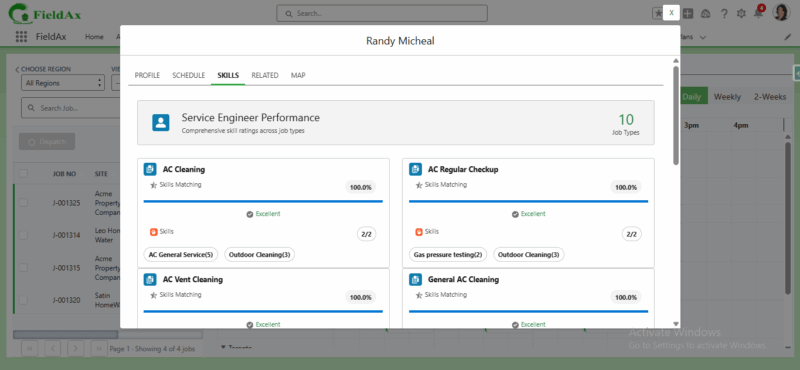
- Service Engineer Skills Display: The Dispatch Board now shows the skills associated with each service engineer.
- Skill Match Percentage: For every job type, FieldAx calculates and displays the skills matching percentage for each engineer. This helps dispatchers quickly identify the most suitable technician for the job.
Before vs Now
- Before: The Dispatch Board only displayed engineers and jobs, without visibility into skill sets.
- Now: Dispatchers can see each engineer’s skills and how well they match the required job type, making assignments more accurate and efficient.
Benefits
- Smarter job-to-engineer assignments based on skills
- Improved visibility of technician capabilities
- Faster decision-making for dispatchers
- Higher first-time fix rate and customer satisfaction
Summer 25 - Date: 17th Mar, 2025
FieldAx SUMMER 2025 Release – Version:1.24
Date:17th March 2025
Overview
We are pleased to introduce the latest release of FieldAx, featuring a variety of new functionalities, improvements, and bug fixes. This documentation provides a comprehensive overview of the changes brought about by this release.
What’s New?
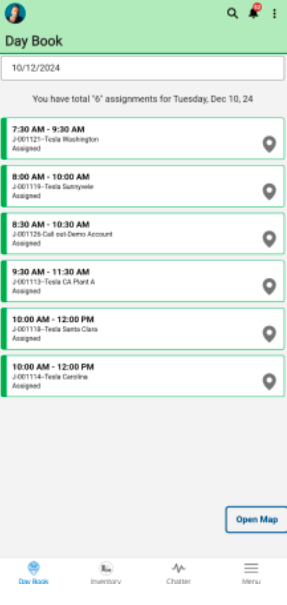
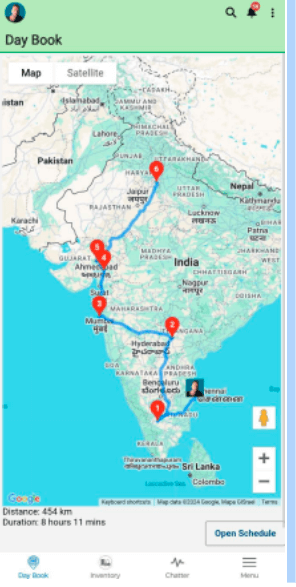
● Route Map Display for Field Service Engineer in Day Book (Mobile View)
Our new Route Map Display feature provides a visual representation of routes for assigned jobs based on the selected date. To view the route map, select the desired date and click the “Open Map” button at the bottom of the Day Book page. This enhancement allows Field Service Engineers to easily view and navigate their job locations for the day. By offering clear route visibility, this feature helps optimize daily planning, improves efficiency, and enhances the overall user experience.
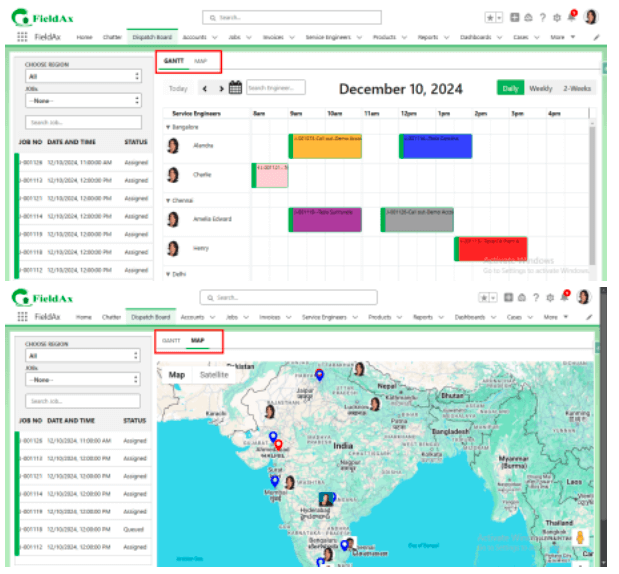
●Enhanced Dispatch Board with Map and Gantt Tabs
We have introduced two new tabs to the Dispatch Board for improved navigation and usability:
1. Map Tab: Displays assigned jobs, unassigned jobs, and service engineer locations, providing a clear visual overview of job and resource locations.
2. Gantt Tab: Shows the calendar view, allowing users to efficiently manage job schedules and timelines.
This enhancement offers a streamlined way to visualize and manage jobs, helping teams better plan and allocate resources while improving overall operational efficiency.
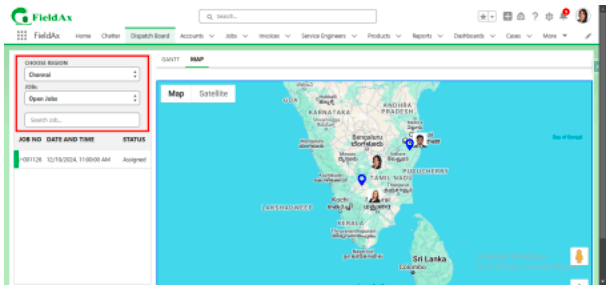
● Filter-Based Job and Service Engineer Locations on Dispatch Board Map
The Dispatch Board map now displays job and service engineer locations based on the applied filters. This enhancement allows users to focus on specific jobs, service engineers, providing a more streamlined and efficient way to manage and visualize resources on the map. By applying filters, users can quickly locate relevant information, improving decision-making and operational efficiency.
● Route Map for Selected Service Engineer on Dispatch Board
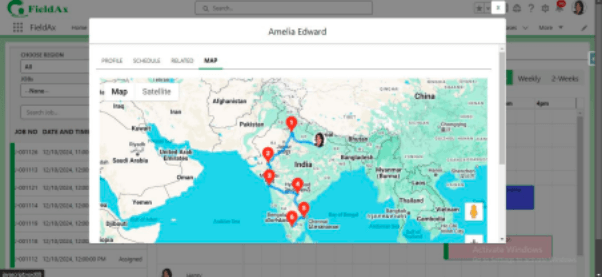
The Dispatch Board now displays the Route Map for the selected Service Engineer based on job assignments within the chosen date range. To view the route map, click on the Service Engineer in the calendar and select the Map tab. This feature provides a clear and visual representation of assigned job locations, helping users efficiently plan and monitor routes. By selecting a date range, teams can easily track and optimize job assignments, enhancing productivity and resource management.
● Primary System Lookup in Job Record
The Job Record now includes a Primary System field, enabling a lookup to the installed system. This enhancement allows users to easily access and reference the installed system associated with the job, improving data accuracy and streamlining job management.
● Visual Indicators for Jobs and Service Locations on Dispatch Board Map
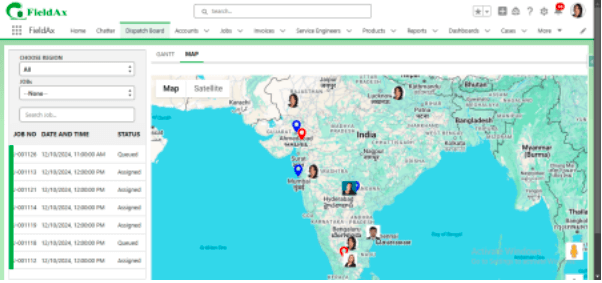
We have enhanced the Dispatch Board map with clear visual indicators to improve job and service location tracking:
- Unassigned Jobs are displayed with a red icon for easy identification. 2. Assigned Jobs are shown with a blue icon to differentiate them clearly. 3. Service Locations are also displayed on the map for better visibility.
This enhancement helps users quickly distinguish between job statuses and service engineers locations, enabling more efficient job management and planning.
● Enhancement: Validation for Replacing Serialized Parts
Field Service Engineers (FSE) can now replace parts only if they have already been consumed by the customer and the inventory stock for the consumed parts is zero. If an FSE attempts to replace a serial number for another location without the part being consumed by the customer, an error message stating “The part is not consumed by the customer” will be displayed. This ensures proper validation and prevents unauthorized part replacements.
● Enhancement: Engineer Travel History Tracking
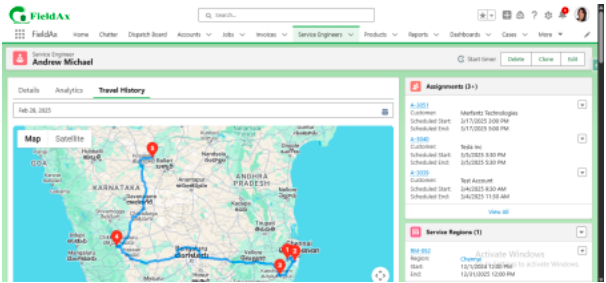
The system now tracks the engineer’s location based on the configuration set in their profile. The location data will be recorded in the Technician Locations object under the respective Service Engineer whenever the engineer performs any of the following actions: Accept, Reject, Arrived, or Finished. This enhancement ensures better visibility of engineer travel history for improved tracking and management.
● Enhancement: Fractional Consumption for Inventory Items
The inventory system has been enhanced to support fractional consumption for products or parts measured in meters or feet. Previously, only whole-number consumption was allowed (e.g., 1, 2, and 5). With this update, users can now enter decimal values (e.g., 0.5, 1.3, 2.7) to accurately reflect the usage of materials. This improvement ensures better precision in inventory tracking and resource management.
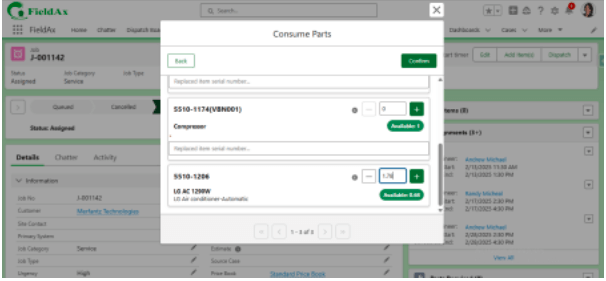
● Enhancement: Location Capture for Service Engineer in Daybook
The system now handles location capture more effectively in the Daybook. If the latitude and longitude fields in the Service Engineer record are empty, clicking the Open Map button with a location will automatically capture the engineer’s current location. However, if the Open Map button is clicked without a location, an error message will be displayed, prompting the user to enable their location services. This enhancement ensures accurate location tracking and improves usability.
● Bug Fix: Fixed Position of Open Map Button on Daybook Page
In this release, we have resolved an issue where the Open Map button would move when swiping through assignments on the Daybook page. The button is now fixed in place, ensuring a stable and consistent user experience when navigating through assignments and accessing the map. This fix enhances usability and eliminates any disruption caused by the button’s movement.
● Bug Fix: My Inventory Feature – Correct Product Display and Search Functionality
In this release, we have fixed an issue with the My Inventory feature where only 200 products from the pricebook were displayed randomly, and searching for products beyond these 200 would return no results. Now, the My Inventory feature correctly displays all products available in the pricebook, even if there are thousands of products (e.g., 5000 products). Searching for any product outside the initial 200 will now return the correct results, improving the accuracy and usability of the inventory search.
● Bug Fix: Timer Reset Issue
Previously, the timer would reset to ‘0’ upon reaching 24 hours, causing a loss of continuous tracking. This issue has now been fixed. The timer will continue counting beyond 24 hours by including the days in the count, ensuring accurate time tracking without resets.
Illavenil 2024 - Date: 4th Mar, 2024
FieldAx Illavenil 2024 Release – Version:1.23
Date:4th March 2024
Overview
We are pleased to introduce the latest release of FieldAx, featuring a variety of new functionalities, improvements, and bug fixes. This documentation provides a comprehensive overview of the changes brought about by this release.
What’s New?
● Day Book
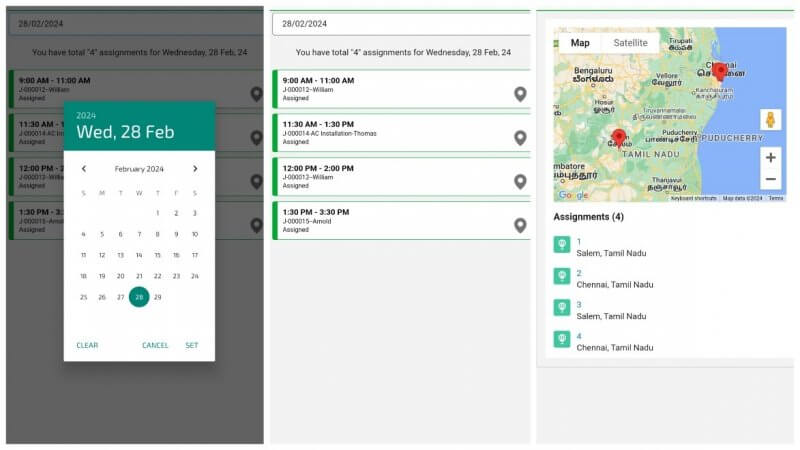
Our new Day Book feature displays your daily assignments directly in the mobile app. Assignments are colour-coded for easy status tracking, and a map icon provides one-touch navigation to each job site via Google Maps. For a broader view, use the ‘Open Map’ button to see all your assignments plotted at once for the selected date.
● Timer for Job and Travel
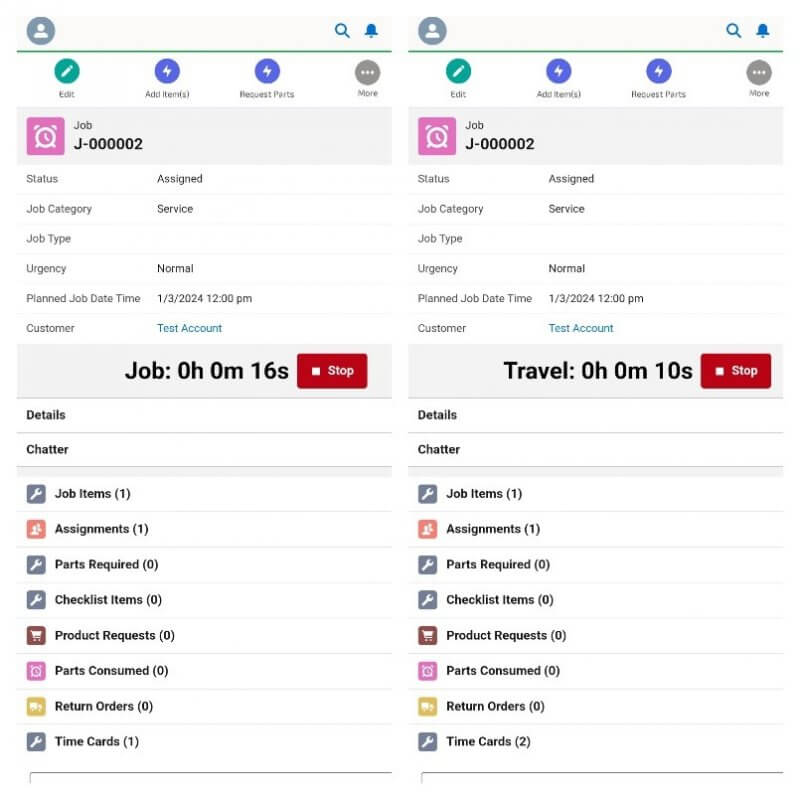
We’ve added a job timer to track work and travel time. The timer starts when a user logs the time and offers a “Stop Timer” button for control. The end time updates automatically on the open time card, and the timer hides once stopped.
● My Inventory Feature
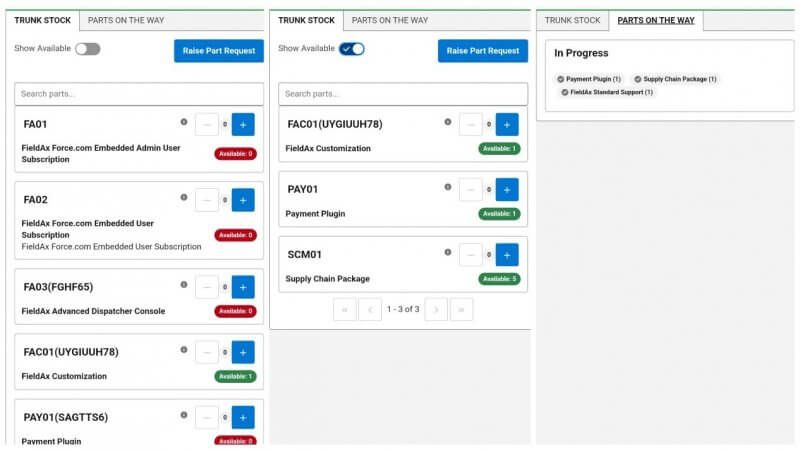
We streamlined the inventory management for service engineers. It will include a location-aware inventory tab, helping engineers quickly find parts in their trunk. Engineers can also raise product requests for unavailable parts, and the app will display the status of existing part requests, preventing unnecessary duplicates.
Features Improved
● Time zone on Dispatch Board
Old functionality: When viewing the Dispatch board, engineers are grouped by region, but assignment times are displayed based on the user’s local time zone. This can lead to confusion when coordinating work across different regions.
New functionality: Engineers are still grouped by region on the Dispatch board. Now, assignment times are displayed according to the time zone of the assigned region. This ensures a consistent view of schedules, regardless of the user’s location.
● Part Transfer module update
Multiple part transfers on a single product request or return order will consolidate into one freight shipment if none of the shipments have been delivered.
● Adding color to assignments on the Dispatch board
Assignments on the dispatch board now include a customizable color field. This allows you to visually differentiate assignments, with FieldAx Green as the default colour.
● Limit Dispatch Board Left Results to Selected Date Range
The Dispatch Board’s left-side results will now update dynamically to match your selected date range on the calendar. This ensures that you’re only seeing the data relevant to the timeframe you’ve chosen.
● New Look for the Map View
Now we have consolidated multiple map views into a single view. This unified view will allow dispatchers to filter jobs, resources, and assignments directly within the map, based on a selected date range from the calendar.
● Quick Dispatch Assignment Title Issue
We have identified a discrepancy in how assignment labels are handled between the Quick Dispatch screen and the main dispatch board. Earlier, the Quick Dispatch screen was limited to displaying the assignment number. We implemented a fix to pull in the correct custom label data, ensuring consistency within the system.
● Fixed – Consumed Parts Deletion Causes Inventory Wipe
There was a bug where using one spare part caused the system to mistakenly delete all other spare parts of the same type, even if they were stored in different locations or had unique tracking numbers.
Known Issues
Our development team is actively investigating these issues.
- Pagination for the Part Transfer feature is not accurate.
- When clicking the ‘Consume Parts’ button, there’s a momentary image flicker before the screen returns to normal.
- The region’s time zone is ignored when calculating duration on the dispatch board.
- The start date and end date in assignments are not being updated when rescheduling assignments in the dispatch board. The correct information is displayed only after refreshing the page.
Contact
We appreciate your continued support and feedback. For any issues or further suggestions, please contact our support team.
Illavenil 2024 - Date: 4th Mar, 2024
FieldAx Illavenil 2024 Release – Version:1.23
Date:4th March 2024
Overview
We are pleased to introduce the latest release of FieldAx, featuring a variety of new functionalities, improvements, and bug fixes. This documentation provides a comprehensive overview of the changes brought about by this release.
What’s New?
● Day Book
Our new Day Book feature displays your daily assignments directly in the mobile app. Assignments are colour-coded for easy status tracking, and a map icon provides one-touch navigation to each job site via Google Maps. For a broader view, use the ‘Open Map’ button to see all your assignments plotted at once for the selected date.
● Timer for Job and Travel
We’ve added a job timer to track work and travel time. The timer starts when a user logs the time and offers a “Stop Timer” button for control. The end time updates automatically on the open time card, and the timer hides once stopped.
● My Inventory Feature
We streamlined the inventory management for service engineers. It will include a location-aware inventory tab, helping engineers quickly find parts in their trunk. Engineers can also raise product requests for unavailable parts, and the app will display the status of existing part requests, preventing unnecessary duplicates.
Features Improved
● Time zone on Dispatch Board
Old functionality: When viewing the Dispatch board, engineers are grouped by region, but assignment times are displayed based on the user’s local time zone. This can lead to confusion when coordinating work across different regions.
New functionality: Engineers are still grouped by region on the Dispatch board. Now, assignment times are displayed according to the time zone of the assigned region. This ensures a consistent view of schedules, regardless of the user’s location.
● Part Transfer module update
Multiple part transfers on a single product request or return order will consolidate into one freight shipment if none of the shipments have been delivered.
● Adding color to assignments on the Dispatch board
Assignments on the dispatch board now include a customizable color field. This allows you to visually differentiate assignments, with FieldAx Green as the default colour.
● Limit Dispatch Board Left Results to Selected Date Range
The Dispatch Board’s left-side results will now update dynamically to match your selected date range on the calendar. This ensures that you’re only seeing the data relevant to the timeframe you’ve chosen.
● New Look for the Map View
Now we have consolidated multiple map views into a single view. This unified view will allow dispatchers to filter jobs, resources, and assignments directly within the map, based on a selected date range from the calendar.
● Quick Dispatch Assignment Title Issue
We have identified a discrepancy in how assignment labels are handled between the Quick Dispatch screen and the main dispatch board. Earlier, the Quick Dispatch screen was limited to displaying the assignment number. We implemented a fix to pull in the correct custom label data, ensuring consistency within the system.
● Fixed – Consumed Parts Deletion Causes Inventory Wipe
There was a bug where using one spare part caused the system to mistakenly delete all other spare parts of the same type, even if they were stored in different locations or had unique tracking numbers.
Known Issues
Our development team is actively investigating these issues.
- Pagination for the Part Transfer feature is not accurate.
- When clicking the ‘Consume Parts’ button, there’s a momentary image flicker before the screen returns to normal.
- The region’s time zone is ignored when calculating duration on the dispatch board.
- The start date and end date in assignments are not being updated when rescheduling assignments in the dispatch board. The correct information is displayed only after refreshing the page.
Contact
We appreciate your continued support and feedback. For any issues or further suggestions, please contact our support team.
Mazhai ‘23 - Date: 1st Nov, 2023
FieldAx Mazhai ‘23 Release Update
Date: 1st Nov, 2023
Overview
We are pleased to introduce the latest release of FieldAx, featuring a variety of new functionalities,
improvements, and bug fixes. This documentation provides a comprehensive overview of the changes
brought about by this release.
What’s New?
- Date Picker on Dispatch Board
Users now have the ability to select any date in the Dispatch board, offering increased flexibility in
scheduling.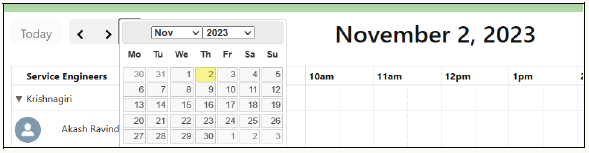
- Search Bar Functionality
A search bar feature has been added to facilitate the quick location of Service Engineers on the
dispatch board, streamlining the assignment process.
- Regional Grouping
Service Engineers can now be grouped by their respective regions on the dispatch board, providing a
clearer overview. - Expanded Dispatch Board Views
Dispatch board views have been enriched with Daily, Weekly, 2-Weeks, and optionally Monthly
options, allowing for better planning and visualization.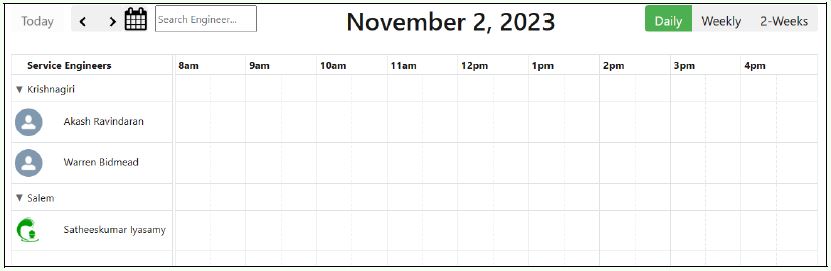
- Customizable Filter for Job Queue
The job queue on the dispatch board now features dynamic columns, offering more flexibility in
customization.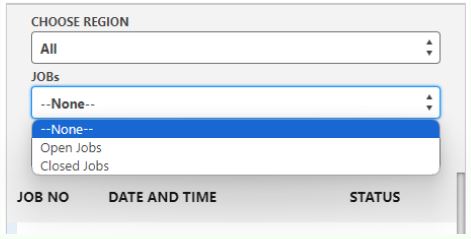
- Enhanced Calendar for Service Engineers
Service engineers’ calendars on the dispatch board now incorporate additional appointments
alongside their assigned jobs.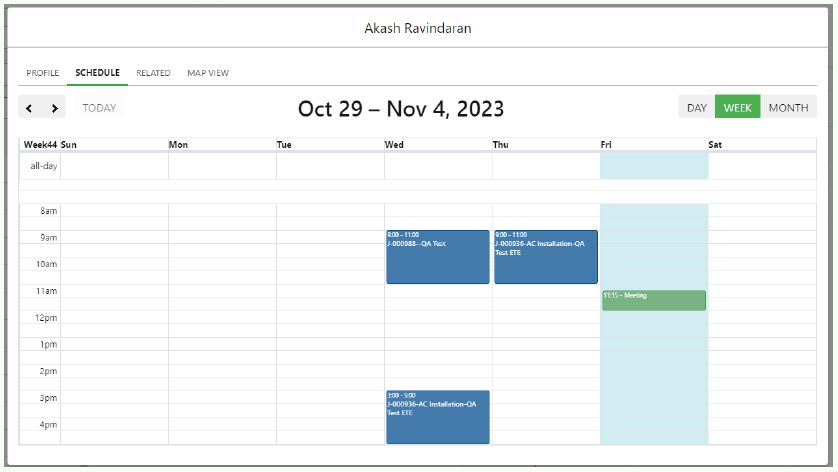
- Heightened Assignment Visibility
The height of assignments on the dispatch board has been raised for improved visibility and clarity. - Region Mapping Visibility
Service engineers’ visibility on the dispatch board is determined by the start and end dates of their
region mappings, preventing simultaneous assignments to multiple regions. - Improved Parts Consumption
Users now have the option to input the replaced item when consuming parts for the required returned
item.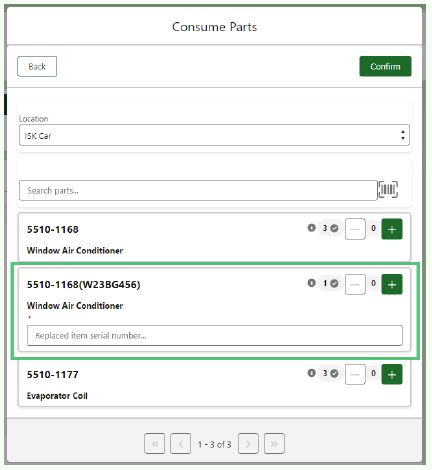
- Customer Signature with Feedback
Field Service Engineers can now collect customer signatures with feedback upon closing a job,
enhancing customer engagement.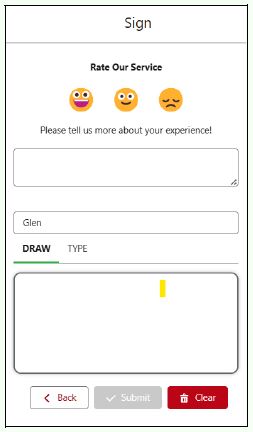
- Inventory Creation with Initial Stock
During the creation of new inventory, users can add available stock, resulting in the creation of
inventory with initial stock levels. - Hover Functionality
Placing the mouse cursor over the assigned job reveals additional information according to the
customer’s requirement, improving job visibility.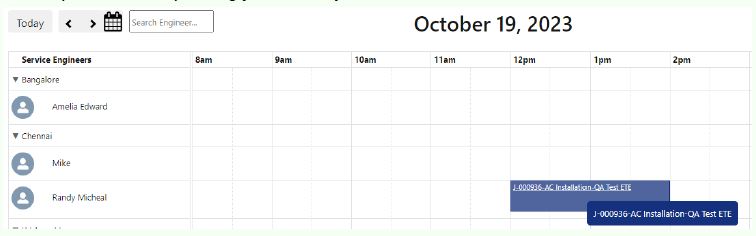
- Customizable Text Color
The text color of assigned jobs on the dispatch board is now customizable, allowing users to
personalize their display. - Reduced Dispatch Board Loading Time
The loading time of the dispatch board has been significantly reduced, enhancing overall efficiency. - New Reports
● Reports displaying ‘Parts Stock Summary’ and ‘Parts Moving Average’ are now available on
the product page.
● A report showcasing Customer feedback for the Field Service Engineers has been introduced.
Features Improved
- Inventory Section Enhancement
The ‘Return Required’ checkbox has been moved to the Inventory section for better organization. - Alphabetical Order for Service Engineers
The Field Service Engineer list is now organized in alphabetical order on the Dispatch board,
facilitating easier navigation. - Streamlined Job Generation
Screen sequence for generating a job from a Service Plan has been improved for a more seamless
user experience.
- Inventory Section Enhancement
Known Issues
Our development team is actively investigating these issue.
- At times, the lines in the week and two-week calendar on the dispatch board may not display
accurately. - Pagination for the Part Transfer feature is not accurate.
- The start date and end date in assignments are not being updated when rescheduling assignments in the dispatch board. The correct information is displayed only after refreshing the page.
- The dispatch board does not take into account the time zone for the service engineer membership with region.
Kodai 2023 - Date: 1st Aug, 2023
Illavenil 2023 - Date: 1st Apr, 2023
Mazhai 2022 - Date: 1st Aug, 2022
Kodai 2022 - Date: 1st May, 2022
Illavenil 2022 - Date: 1st Jan, 2022
Mazhai 2021 - Date: 1st Oct, 2021
Mazhai 2020 - Date: 1st Oct, 2020
Mazhai 2019 - Date: 1st Oct, 2019
Kodai 2019 - Date: 1st May, 2019
Illavenil 2019 - Date: 1st Aug, 2019